Guide to the DGCA Pariksha Portal
The DGCA Pariksha portal is pariksha.dgca.gov.in.
Log in with P followed by your Computer Number.
You book papers, get the admit card and read the result there.
Ready Aviator · Screens from the portal and its user manual
Pariksha login
Open pariksha.dgca.gov.in and choose Candidate Login under Flight Crew.
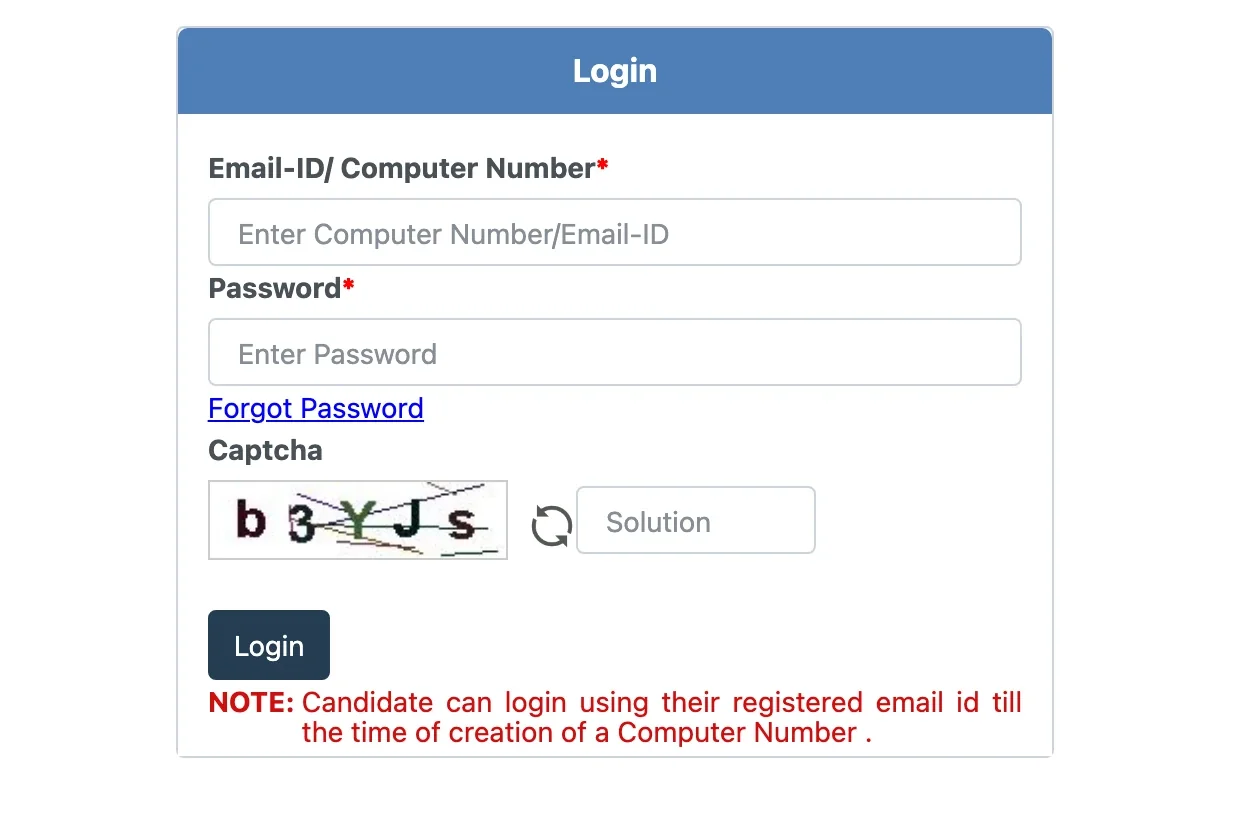
Your login ID is the letter P followed by your Computer Number. Until the number is issued, log in with the email you registered.
The password is the one you set at registration. If you have lost it, the Forgot Password link sits under the password box.
If the login fails, check these:
- The P is in front of your Computer Number
- No number yet: use your registered email instead
- The captcha matches; the arrow gives a fresh one
- You opened the activation link within 24 hours; after that the form is cleared
- A number from before this portal is first registered here as OLD Candidate Registration
- You are on Pariksha, not eGCA. They are separate accounts
Jump to: no Computer Number yet, have the number, paper booked, sat the paper.
Nine steps on Pariksha
Fees and sessions change by notice. Check pariksha.dgca.gov.in before you pay.
- 1Open the portal
- An old Computer Number still registers here
- Click Here To Proceed
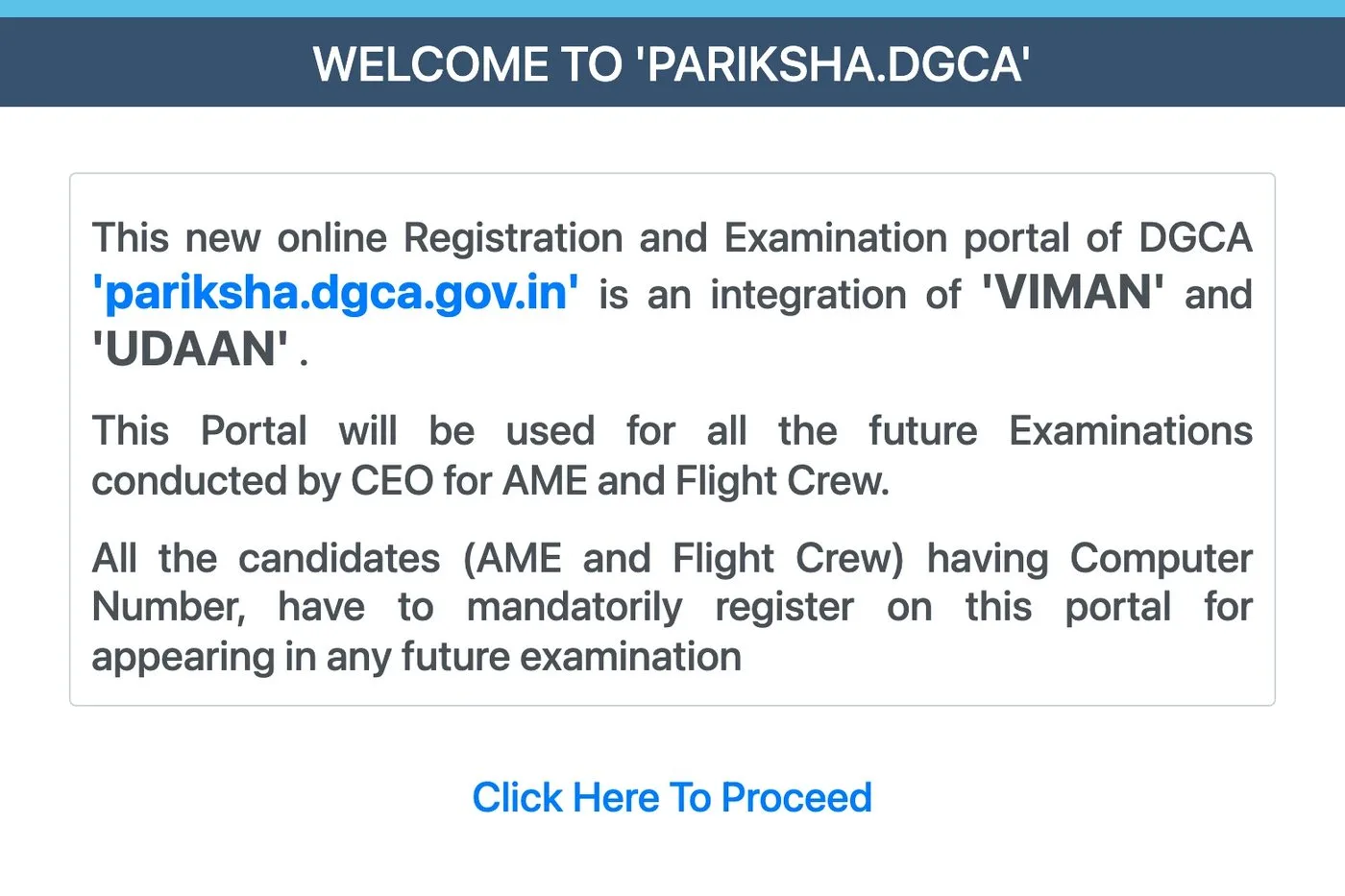
The Pariksha welcome page. - 2Get your Computer Number first
- Flight Crew, not the green AME column
- New registration: the Computer Number, free
- Log in here once the number arrives
- Notice board: windows, admit cards, results
Note. Pariksha runs the exam and eGCA issues the licence. The documents the Computer Number needs.
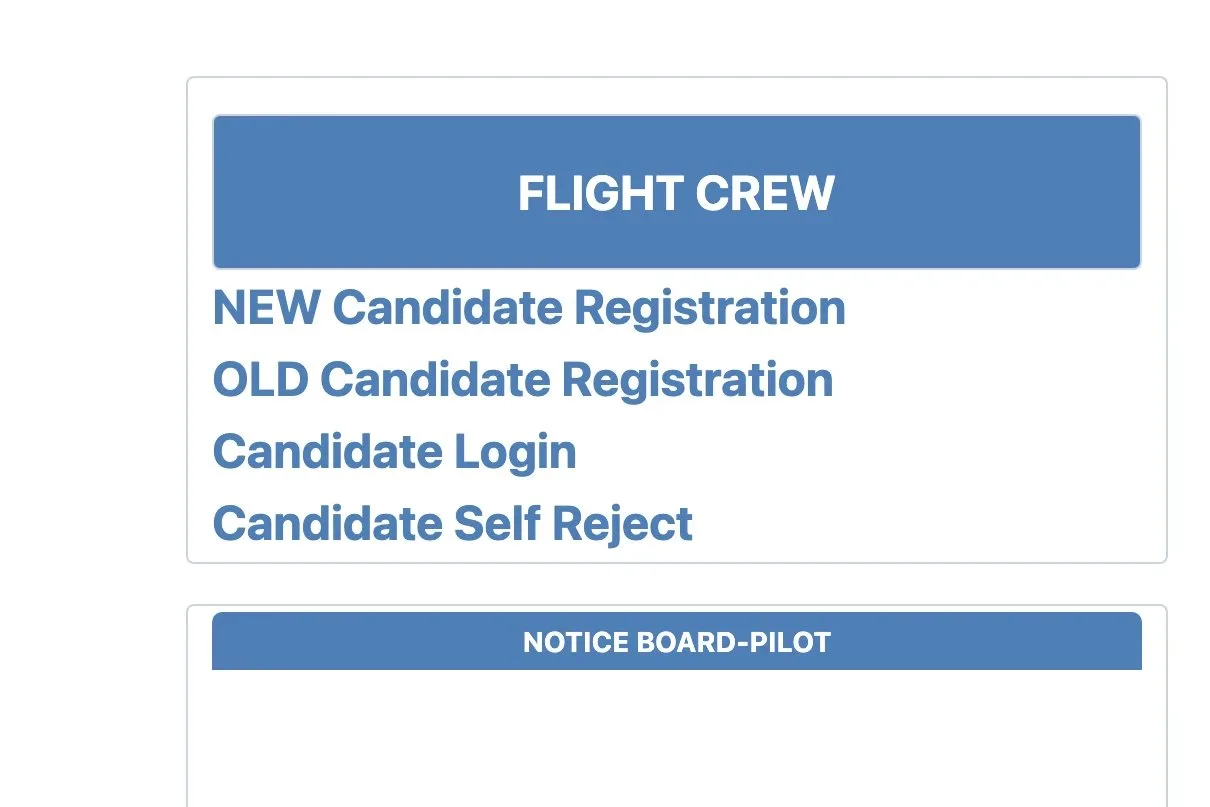
The Pariksha front page. New Candidate Registration sits under Flight Crew. - 3Fill the registration form
- Your name, exactly as on the Class 10 certificate
- Date of birth, from that same certificate
- Indian mobile number; the OTP comes here
- Email that gets the activation link
Note. The activation link lasts 24 hours. Miss it and the saved form is cleared.
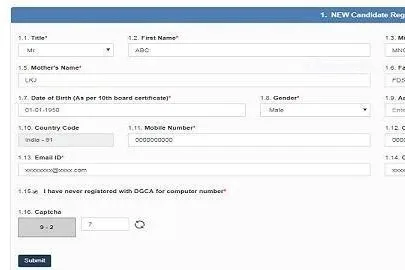
From the portal's own user manual. - 4Candidate login
- Your Computer Number, with the P in front
- The password you set at registration
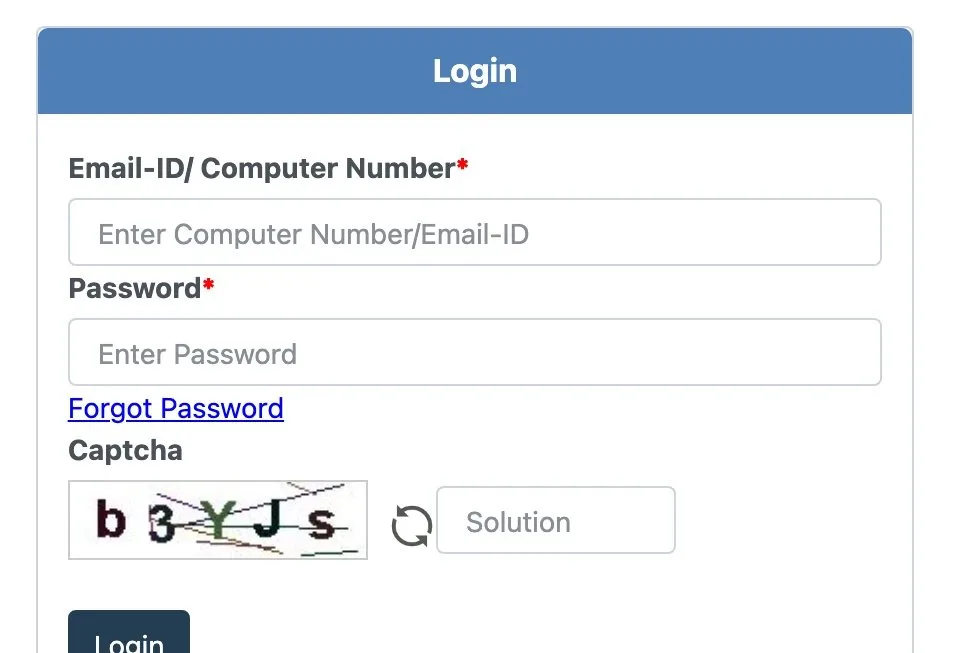
The Pariksha login. Enter P followed by your Computer Number. - 5Open the examination form
- Session: only an open one is listed
- Category: CPL or ATPL, set in your profile
- First choice of centre
- Second choice, used when the first is full
Note. Each session notice sets its own dates. On-demand seats are first come, first served. One application a session.
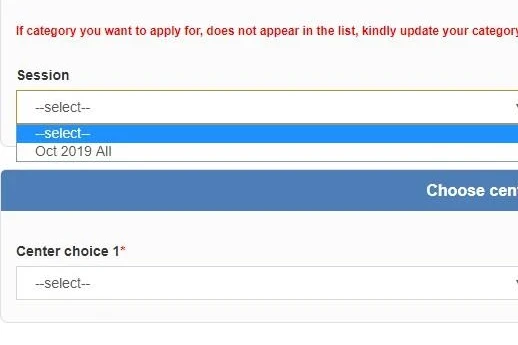
From the portal's own user manual. - 6Pick the papers
- Open the paper list
- Tick each paper; a CPL needs five in all
- An oral picks its own centre
Note. You can sit one specific aircraft paper a session. Scrutiny strikes out a paper you cannot sit. What each paper covers.
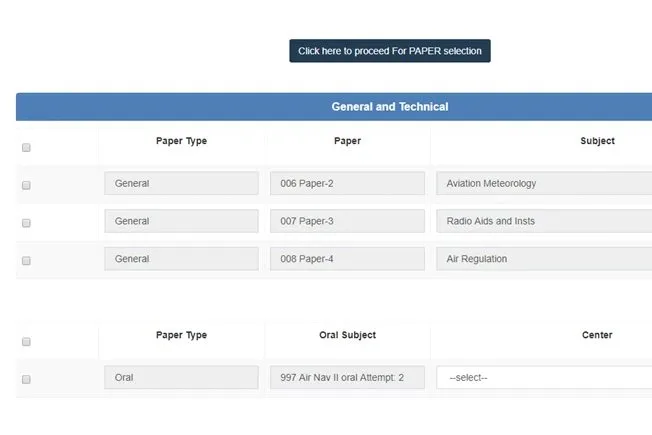
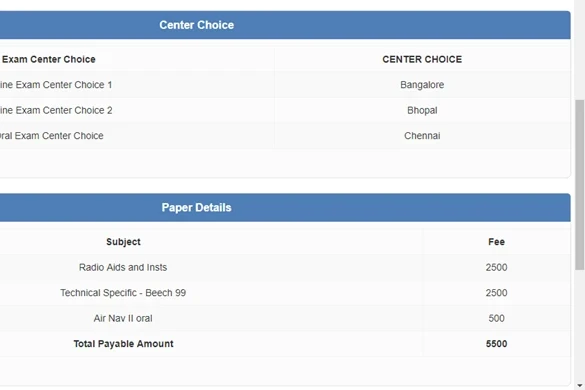
From the portal's own user manual. - 7Pay on Bharatkosh
- Both centres, as they will be allotted
- 2,500 a paper regular, 5,000 on demand
- The total, paid on Bharatkosh by card or bank
Note. The fee is never refunded or moved. Pay before 2300 on the closing day.
From the portal's own user manual. - 8Download the admit card
- It comes on the portal and by email a few days before the paper
- Centre, reporting time and the time allowed are printed on it
- Carry it printed, with an original government photo ID
- Download it the day it appears; the portal slows on release day
Note. Students report phone copies of the card and photocopies of the ID being turned away. Sit a timed DGCA mock test before the day.
- 9Check the result
- Your result is in your own Pariksha login, within 30 days
- Students report a score SMS from NIELIT within a few days
- 70 per cent a paper, each paper cleared on its own
- A pass counts if it is within five years of your licence application
Note. DGCA no longer posts result lists. There is no re-evaluation, so report a wrong question during the paper. Revise any paper under 70 in the DGCA question bank.
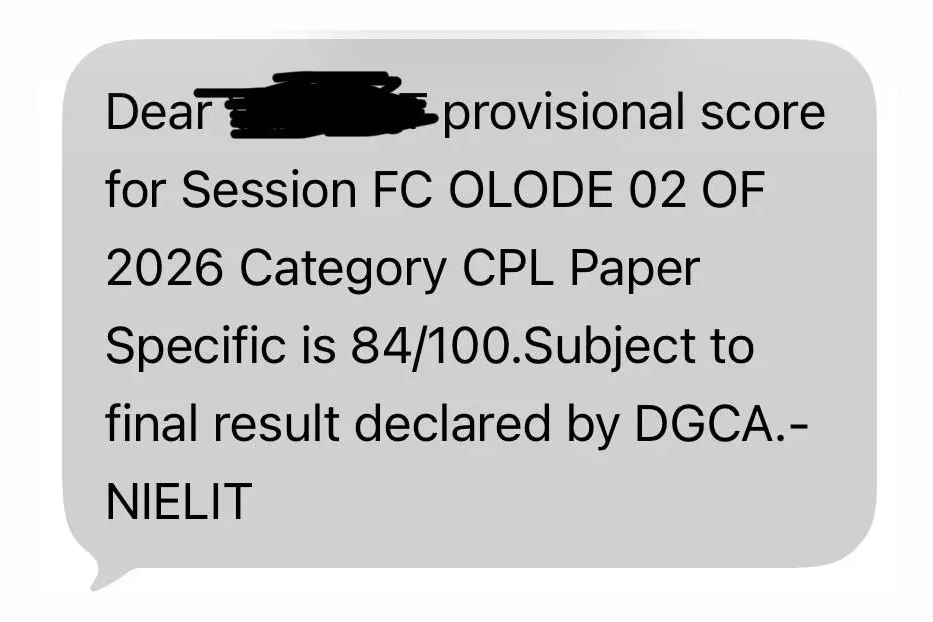
A real result SMS, with the name covered.
Questions people ask
What is my Pariksha login ID?
The letter P followed by your Computer Number. Before the number is issued, you log in with your registered email.
Where is the Pariksha login?
At pariksha.dgca.gov.in, as Candidate Login under Flight Crew. The AME column is a different login.
Why is my DGCA Pariksha login not working?
Check the P before your number, the captcha, and that you activated the account within 24 hours. Pariksha and eGCA are separate logins. Every check, with the login screen.
What do I need to pass?
70 per cent in each paper, cleared on its own. DGCA publishes no negative marking rule, and students report none. The Class 1 medical, which the licence also needs.
How long does a pass last?
Each paper must be passed within the five years before you apply for the licence. An older pass has to be sat again.
What does a paper cost?
2,500 rupees regular, 5,000 on demand, plus 500 for a second or third oral attempt.
How often can I sit?
Four regular sessions a year and eight on demand between them, at 5,000 a paper. Students report on-demand seats in Delhi and Mumbai go within hours.
What do I carry on the day?
A printed admit card and an original government photo ID: Aadhaar, passport, licence or voter card.
Can I take a calculator?
Only into Air Navigation: a navigation computer such as the CX-3, and a scientific calculator without multiple memories. None in the other papers.
Is Pariksha the same as eGCA?
No. Pariksha runs the exam and eGCA issues the licence, on separate accounts. How the RTR(A) exam works.
Practise the DGCA question bank
A worked solution behind every question in the bank, free with an account.
Sign up for freeKeep reading
Sources: CAR 7-B-I, paras 5.6, 6.7 and 8.5; Pariksha user manual, Issue IV; Pariksha notice, 22 Sep 2026; result notice, 1 Oct 2026; session instructions, paras 10 and 11.